I see it everywhere: “Full access” on Codex. Even from people who don’t run their agents in a VM, where the infamous rm -rf ~/ wouldn’t be a worry.
And it’s not a hypothetical. In July, OpenAI confirmed that GPT-5.6 in Codex had deleted users’ home directories in a handful of cases. On Full access, without a sandbox, the model tried to point $HOME at a scratch folder and deleted $HOME instead. Nothing in between asked.
I think there are two main reasons people let their agent do anything and everything:
- Not knowing how destructive an agent can get
- Permission fatigue
A proper permission system has been a must for me since the very first days of Prokop. No more accidents.
Easier said than done. One day I caught myself clicking Allow Once on the same harmless search for about the tenth time, and I realized I’d stopped reading what I was allowing.
grep -rl foo src | xargs grep -L barRead-only. Prokop asked every time and labeled it Destructive. That bug was mine, and it trained me to click through, which is the exact thing a permission system exists to prevent.
Three agents, three ideas of danger
Prokop runs sessions on three harnesses: your installed Claude Code, your installed Codex, and Prokop’s own. Claude Code and Codex each come with their own approval model and their own opinion on what’s dangerous, and in general I find both lacking. And I don’t want to rely on models being good enough.
Imagine three contractors working in your house, each with their own rules for what needs your signature. One asks before touching anything. Another only asks about the electrics. You want some certainty and predictability.
So every tool call goes through the same check, no matter which harness it comes from. Prokop’s runtime calls it directly. Claude Code goes through the Agent SDK’s canUseTool callback. Codex runs a PreToolUse hook that talks to Prokop over a private socket that exists for one turn. Prokop doesn’t touch your Codex config, and Codex keeps its own workspace sandbox on top.
A number doesn’t tell you why
The first version gave every command a risk level, and you picked a threshold. Off, none, low, medium, high. Five levels, one number.
It was wrong in both directions. Secrets were matched by substring, so password-reset.ts counted as a secret. And git reset --hard never asked at all, because a normalization step stripped the flag before the check ever saw it.
But the bigger problem was the number itself. A risk score answers “how scared should I be?” What you actually need to know is “what exactly is this going to do?”
When a colleague reviews your pull request, they don’t say “risk 7”. They say “this deletes the build folder and reads your .env”.
Facts first, decisions later
So the rebuild splits the work in two. An analyzer looks at a command or a file operation and reports facts. It decides nothing.
The facts are concerns. Outside the workspace. Secrets (.env, keys, .ssh/, .aws/, matched by name this time). Destructive, like force deletes, hard resets and force pushes. Opaque, for things it can’t see through. Plus one flag for the catastrophic stuff: rm -rf /, rm -rf ~, dd to a device, shutdown.
Concerns stack. rm -rf ~/.ssh is destructive, outside the workspace and secret, all at once.
Then exactly one function turns facts into a decision, based on the mode you picked:
| Standard (default) | Extended | Full access | |
|---|---|---|---|
| clean | runs | runs | runs |
| outside workspace | asks | runs | runs |
| secrets | asks | asks | runs |
| destructive | asks | asks | runs |
| catastrophic | asks | asks | asks |
Catastrophic asks even on Full access. So in Prokop, the rm -rf ~/ from the beginning of this post stops and waits for you, whatever mode you’re in.
That doesn’t make Full access safe. It still runs anything destructive and reads your secrets without asking. My advice: never go above Extended, unless the Prokop server runs in a VM where losing everything costs you nothing.
There is no “ask for everything” mode. I know that sounds backwards for a permission system. But a mode that asks about everything is just the xargs bug as a setting. You’d be back to clicking without reading by lunch.
Reading a shell command like a human would
Most of the work went into reading shell commands the way you would.
You don’t panic when a commit message says “rm old file”. It’s just text. But the same words inside sh -c '...' will actually run. So the analyzer unwraps shell wrappers, understands quotes and substitutions, and only screens the text that will execute. It follows cd, so cd build && rm -rf . resolves to the right folder.
When it can’t tell, it assumes the worst. Piping downloaded code into a shell (curl ... | sh) counts as destructive, so it asks in every mode except Full access. A destructive command with a target it can’t resolve, like rm -rf $DIR, counts as catastrophic, because otherwise Full access would just run it. The only exception is when the same command plainly sets $DIR to a path first. Then the path is judged by that value.
That’s exactly the GPT-5.6 pattern: a home path in a variable, then rm -rf on the variable. On Codex’s Full access nothing stops it. In Prokop it’s catastrophic, so it asks in every mode.
The xargs bug was a failure of exactly this kind of reading. xargs runs its arguments as a command, so its arguments get screened for dangerous tokens. The screen also included the word xargs itself, which is on the list. The word matched itself.
The fix is to judge xargs the way you would. By the command it runs, not by its name.
'ls | xargs wc -l'                 // runs
'ls | xargs rm -rf'                // destructive, asks
'ls | xargs -n1 cat .env'          // secrets, asks
'xargs --arg-file=.env echo'       // secrets, asks
Some things you should never “always allow”
You can allow something once, for the session, or for the whole workspace. Except anything destructive or catastrophic. Those only ever offer once.
“Always allow rm -rf” is not a decision anyone should make by accident at 11 pm.
When the new system shipped, it also wiped every saved approval. Old approvals were made under old rules. I could have translated them, but a grant costs one click to rebuild. Not worth carrying the old mistakes forward.
Show me the part I need to read
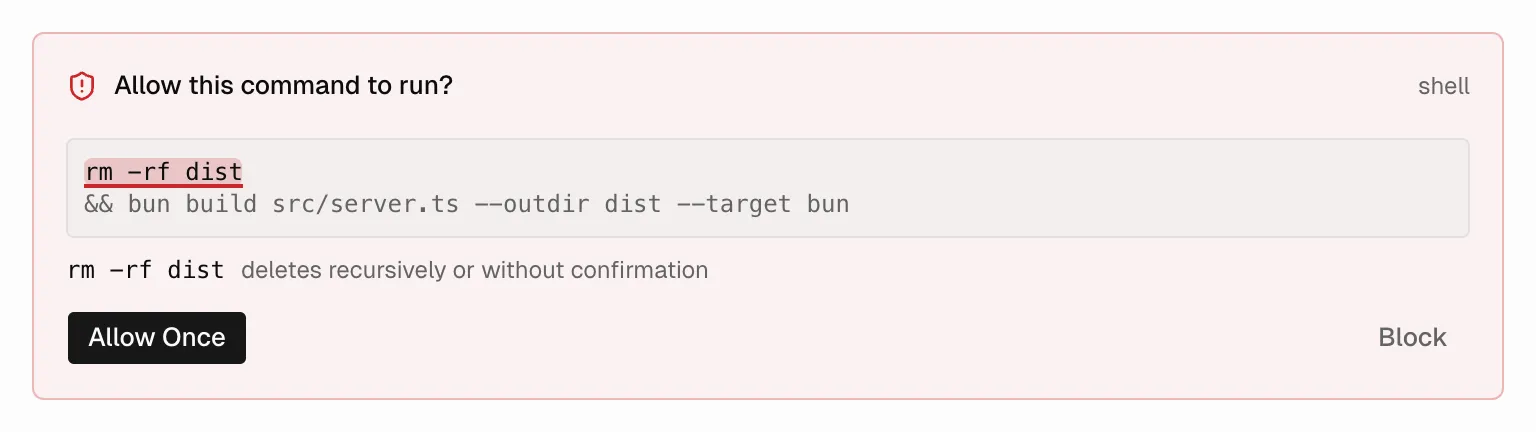
Even when an ask was correct, it was hard to review. A long command showed up as one paragraph, and you had to find yourself which parts were flagged and what they actually did. That’s so exhausting it pushes you right back to “yolo, approve, fingers crossed”.
So now every concern points at the exact part of the command it’s about, with a reason in plain words. git reset --hard HEAD~1, “discards uncommitted changes”. /etc/hosts, “outside the workspace”. That works even through sh -c and other shell wrappers, which was the fiddly part, because the analyzer reads the unwrapped command but the highlight has to land in the one you see.
The card shows each pipeline stage on its own line, marks the flagged part, and dims the rest. The color tells you which mode would have let it through. Amber for outside the workspace, which Extended would run. Red for secrets and destructive, which only Full access would run. Catastrophic gets the strongest red and its own badge, because nothing runs it without you.
Waiting is part of it too
An approval is a pause, and the pause had its own bugs.
Time spent waiting for me counted against the tool’s own time limit. Approve a command after a minute and it failed with a timeout. Now the clock stops while it waits.
If my laptop went to sleep while a Claude Code session needed approval, the request was refused immediately. Now it waits until I’m back. And if a session on another machine needs me, the machine I’m using tells me.
None of that is classification. All of it decides whether you actually get to make the decision.
What it isn’t
This is not a sandbox. It reads commands before they run, and it can’t know what a script does once it’s running. It will have gaps. Unless a model evaluates each command with all the context it needs, there’s always the risk of an agent running the innocent ./nuke-computer.sh.
What it does is ask less often about things that don’t need asking, and make the remaining questions quick to answer.
If you want to make more conscious decisions about what your agents are allowed to do, try Prokop. And if a prompt ever feels like fatigue, tell me which command it flagged as too risky. I’ll gladly keep improving it.
I wrote before that when an agent deletes your production database, it’s still on you, because you built the environment it ran in. A permission system is a big part of that environment. The safest one isn’t the one asking most often.
It’s the one whose questions you still read.